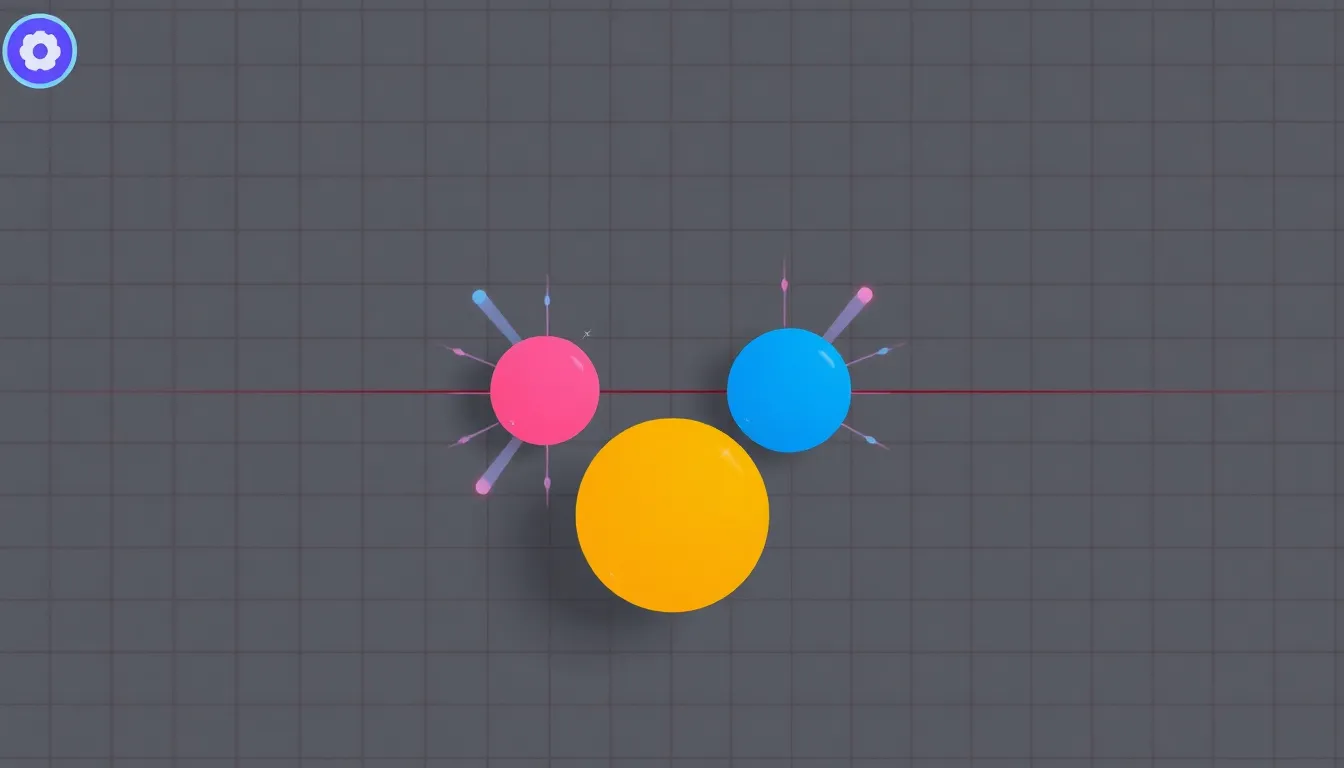
Collision detection is a fundamental aspect of game development, especially in 2D and 3D environments. It allows us to determine when two objects interact, which very important for gameplay mechanics. There are several algorithms and techniques that can be used for effective collision detection.
The simplest form is bounding box collision detection, which uses rectangles to enclose objects. This method is computationally inexpensive and works well for axis-aligned bounding boxes (AABB). The check is straightforward: if the bounding boxes of two objects overlap, a collision has occurred.
def aabb_collision(box1, box2):
    return (box1.x < box2.x + box2.width and
            box1.x + box1.width > box2.x and
            box1.y < box2.y + box2.height and
            box1.y + box1.height > box2.y)
Another approach is the circular collision detection, which is particularly useful for round objects. Instead of boxes, we check the distance between the centers of the circles and compare it to the sum of their radii.
import math

def circle_collision(circle1, circle2):
    distance = math.sqrt((circle1.x - circle2.x) ** 2 + (circle1.y - circle2.y) ** 2)
    return distance < (circle1.radius + circle2.radius)
For more complex shapes, we can use Separating Axis Theorem (SAT), which is effective for convex polygons. This method involves projecting the shapes onto potential separating axes and checking for overlaps.
def project_polygon(axis, polygon):
    min_proj = float('inf')
    max_proj = float('-inf')

    for vertex in polygon.vertices:
        projection = (vertex.x * axis.x + vertex.y * axis.y)
        if projection < min_proj:
            min_proj = projection
        if projection > max_proj:
            max_proj = projection

    return (min_proj, max_proj)

def sat_collision(poly1, poly2):
    axes = poly1.normals + poly2.normals
    for axis in axes:
        proj1 = project_polygon(axis, poly1)
        proj2 = project_polygon(axis, poly2)
        if proj1[1] < proj2[0] or proj2[1] < proj1[0]:
            return False
    return True
Choosing the right algorithm depends on your game’s requirements and the types of objects involved. For fast-paced games, AABB is often sufficient. However, if your game involves a lot of intricate shapes, you might want to invest more time into implementing SAT or even spatial partitioning to optimize collision checks.
Spatial partitioning techniques, like quad-trees and octrees, can help manage the number of collision checks by dividing the game world into smaller sections. This allows you to only check for collisions between objects that are close to each other. Implementing a quad-tree can be done as follows:
class QuadTree:
    def __init__(self, boundary, capacity):
        self.boundary = boundary
        self.capacity = capacity
        self.points = []
        self.divided = False

    def subdivide(self):
        # Code to subdivide the quad tree
        pass

    def insert(self, point):
        # Code to insert points into the quad tree
        pass

    def query(self, range, found):
        # Code to query points within a range
        pass
By combining these methods, you can achieve a robust collision detection system suitable for various game scenarios. Each method has trade-offs in terms of accuracy and performance, so it's crucial to evaluate them based on your specific needs. Balancing precision with computational efficiency can significantly affect your game's performance and user experience.
Oura Ring 5 Sizing Kit - Size Before You Buy Oura Ring 5 - Unique Sizing, Not Standard Ring Sizing - Receive Amazon Credit for Oura Ring 5 Purchase
$10.00 (as of July 7, 2026 13:54 GMT +00:00 - More infoProduct prices and availability are accurate as of the date/time indicated and are subject to change. Any price and availability information displayed on [relevant Amazon Site(s), as applicable] at the time of purchase will apply to the purchase of this product.)Implementing collision responses in Pygame
Once a collision has been detected, the next step is to implement collision responses. That's where the game reacts to collisions, affecting the physical behavior of the objects involved. In a simple case, this can involve reversing the direction of movement or applying forces. Pygame provides a framework that can help facilitate these interactions.
For a basic response in a 2D game, we often need to adjust the positions of colliding objects to ensure they no longer overlap. This can be achieved by calculating the penetration depth and moving the objects apart appropriately.
def resolve_collision(obj1, obj2):
    overlap_x = (obj1.width / 2 + obj2.width / 2) - abs(obj1.x - obj2.x)
    overlap_y = (obj1.height / 2 + obj2.height / 2) - abs(obj1.y - obj2.y)

    if overlap_x < overlap_y:
        if obj1.x < obj2.x:
            obj1.x -= overlap_x
        else:
            obj1.x += overlap_x
    else:
        if obj1.y < obj2.y:
            obj1.y -= overlap_y
        else:
            obj1.y += overlap_y
In more dynamic scenarios, you may want to apply physics-based responses. For instance, if two objects collide, you can calculate their new velocities based on their masses and the angle of impact. This requires some basic physics calculations, such as conservation of momentum.
def apply_physics_collision(obj1, obj2):
    total_mass = obj1.mass + obj2.mass
    new_velocity_x = (obj1.velocity.x * (obj1.mass - obj2.mass) +
                      2 * obj2.mass * obj2.velocity.x) / total_mass
    new_velocity_y = (obj1.velocity.y * (obj1.mass - obj2.mass) +
                      2 * obj2.mass * obj2.velocity.y) / total_mass

    obj1.velocity.x = new_velocity_x
    obj1.velocity.y = new_velocity_y
When implementing collision responses, it is essential to consider the game’s design. For example, in a platformer, you might want to apply different responses for ground collisions versus wall collisions. Additionally, friction and restitution can be factors that influence how objects behave post-collision.
def calculate_friction(obj1, obj2):
    friction_coefficient = 0.5
    normal_force = obj1.mass * 9.81  # assuming gravity
    friction_force = friction_coefficient * normal_force

    if obj1.velocity.x > 0:
        obj1.velocity.x -= friction_force / obj1.mass
    elif obj1.velocity.x < 0:
        obj1.velocity.x += friction_force / obj1.mass
Incorporating collision responses effectively will make your game feel more realistic and engaging. Testing various scenarios during development very important to ensure that the responses behave as intended and enhance the overall gameplay experience.